

The race to develop ever better models is breathtaking. Every weeks a few new good models are released – open, closed, frontier, mid-tier, efficient, expensive, bargain …
My approach is to be quite obsessive, inform myself and test most new models, but then curate a small roster of models I use regularly. It’s good to know models well, to have a mental model of how they work and what tasks they are good for – public benchmarks are not enough, there’s no substitute to real experience. And that’s hard to do if you target more than a handful.
Great AI models are powerful and deliver a lot of value, making my work and life immeasurably better, so I’m willing to spend. But I also care a lot about cost and always on the lookout for a bargain, so that’s an important factor too.
Models
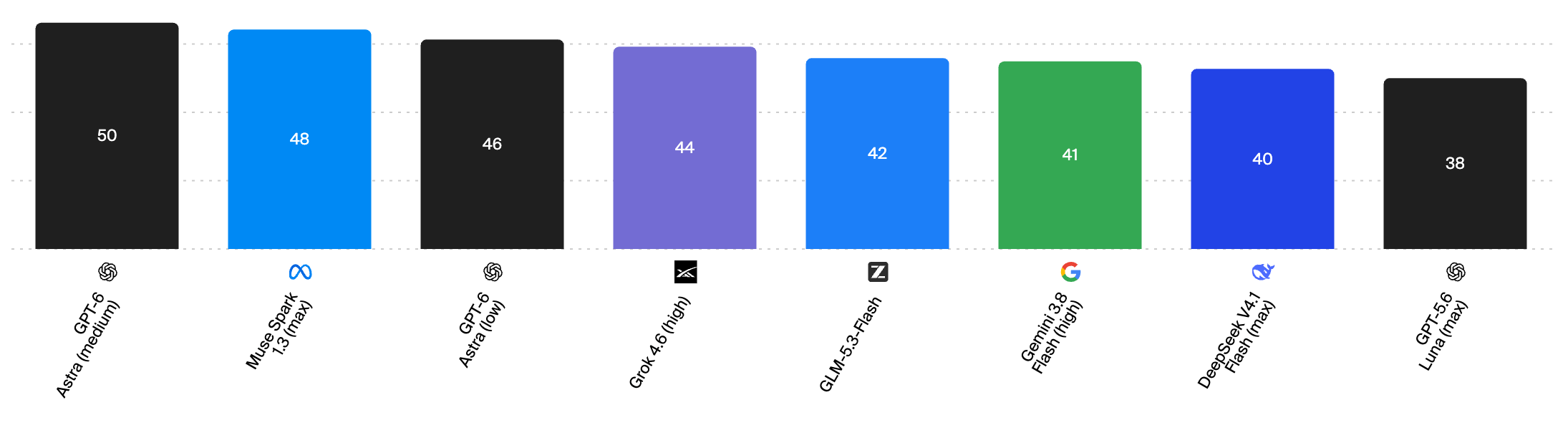
(benchmarks and charts from Artifical Analysis)
OpenAI GPT-6 Astra
Effort: light/low ~ medium
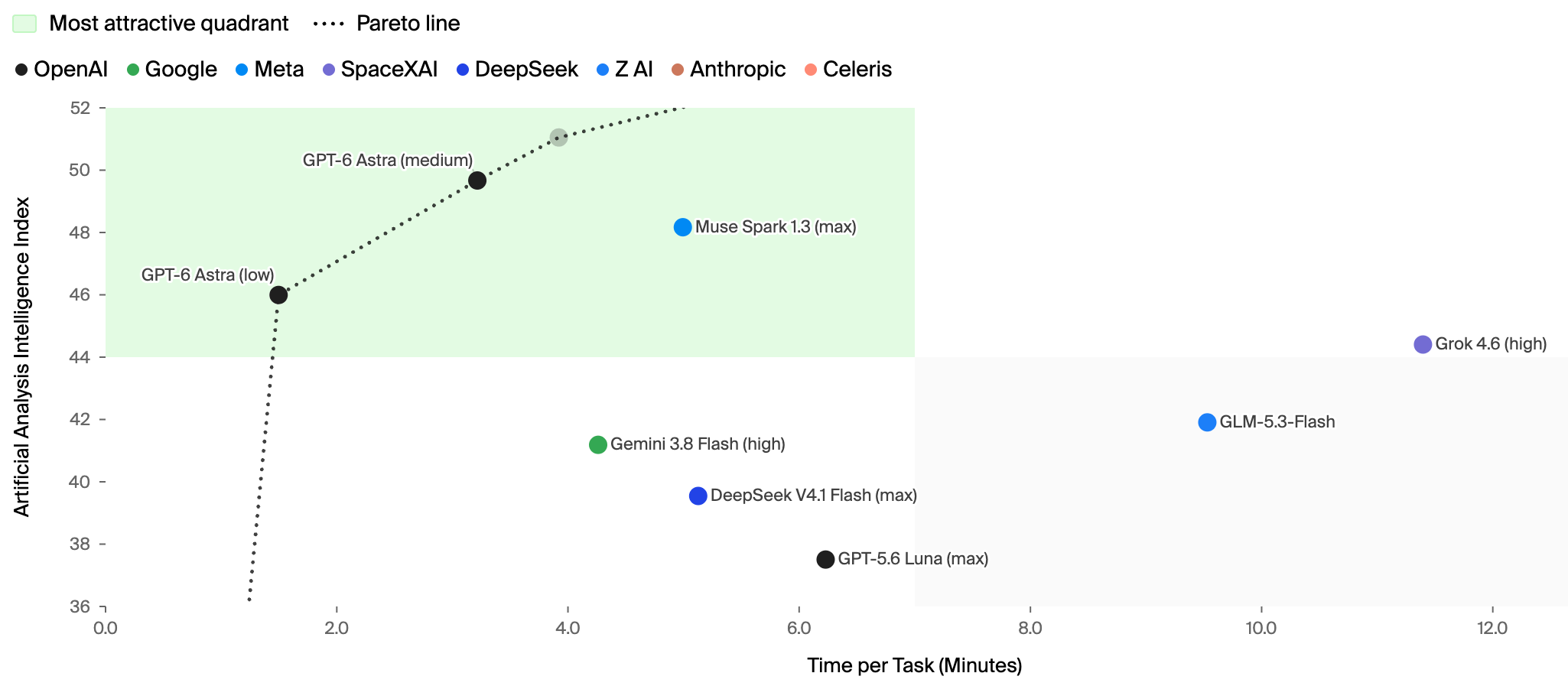
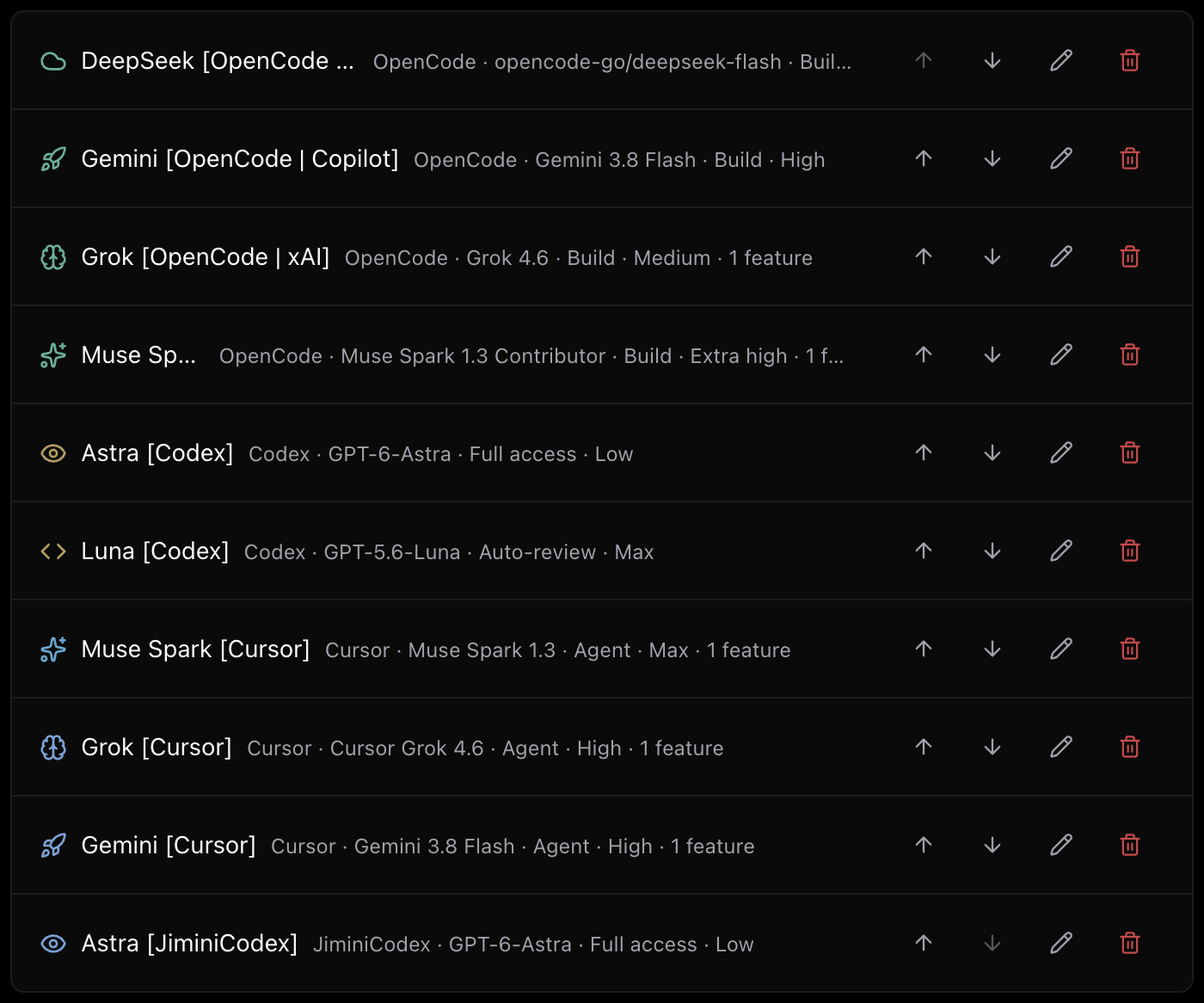
This is my current “daily driver” in the ChatGPT/Codex app. It’s a terrific model. Raw intelligence isn’t always obviously apparent, in comparison to the previous generation of models, but when it comes to automating browser and computer tasks, thinking on the fly, and running effective interactive sessions, Astra is quite wonderful. And because it’s a larger pre-train and relies less on reasoning chains, it is amazingly fast.
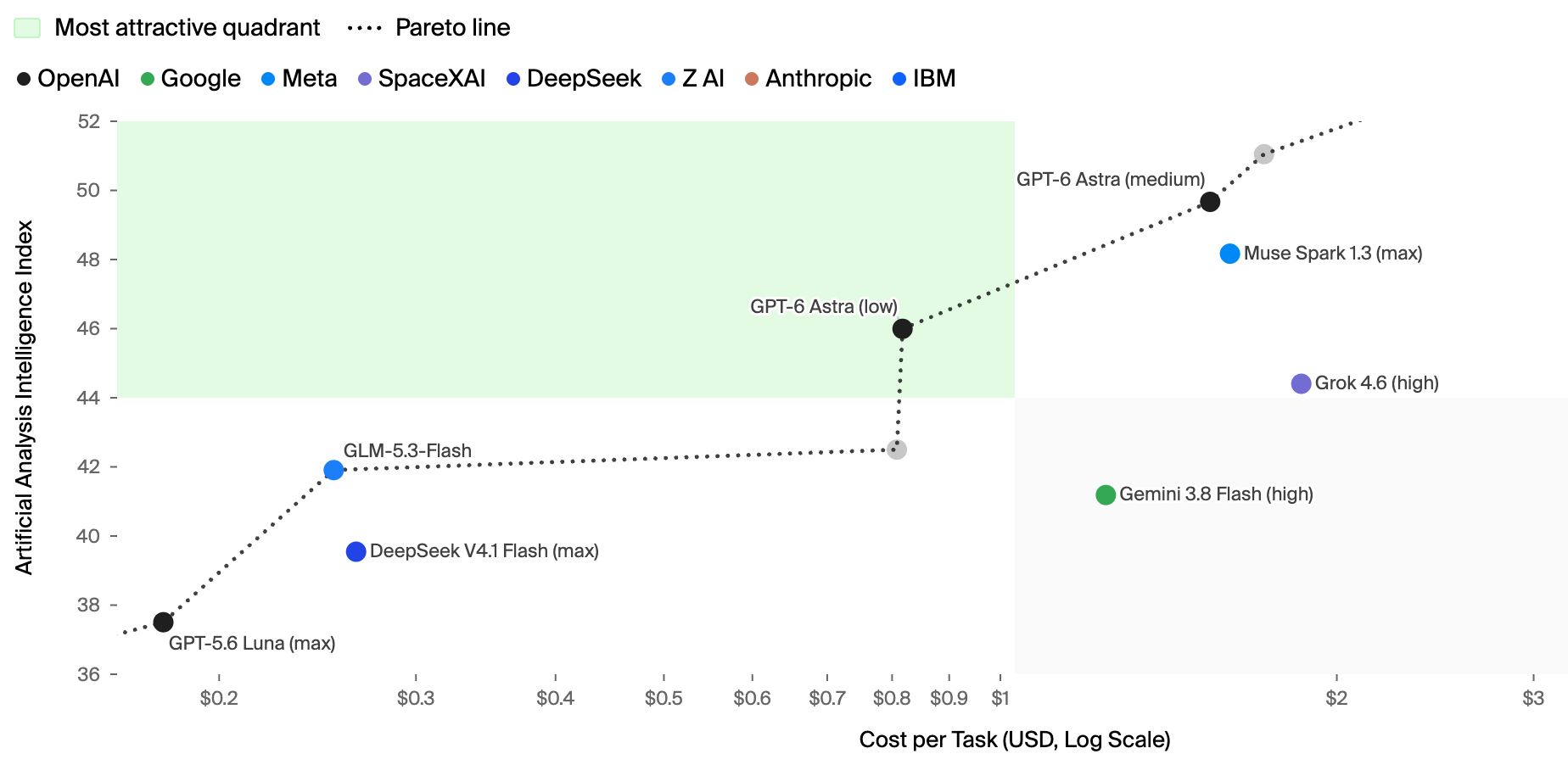
Even though the cost per token is 2.5x of 5.6-Sol, the effective cost of Astra with low effort is similar to Sol with medium~high effort, but much faster and more capable. At medium effort, Astra is AGI-ish intelligence of strength and refinement I have not seen before.
Meta Muse Spark 1.3
Effort: Maximum
Meta’s Muse Spark 1.3 is one of two releases this year coming from American large companies that took me by surprise (the other being xAI’s Grok – see below). It isn’t the strongest model, just a step behind the frontier, but it is very well-rounded and wins on speed, and especially cost. It’s great for agentic workflows, and even for straightforward coding tasks, and I especially like its writing style – I consider it to be the very best model for writing at this time, and the only one that doesn’t produce that grating AI voice.
The costs are significantly lower than competing models anyway, but the real bargain is the “contributor” edition – Meta offers the model for ~5% of the cost if you agree to allow them to keep your data and use it for improving future models. To me, that’s a very acceptable deal for personal and open-source work. Meta Muse Spark 1.3 Contributor now powers my Hermes agent, with the various “factories” and workflows I am using it for.
xAI Grok 4.6
Effort: Medium~High
I didn’t see this coming. Grok lagged behind other models forever, and I mostly wrote it off, when earlier this year xAI acquired Cursor and with it the team’s expertise in post-training. Combined with xAI’s massive compute infrastructure and existing pre-trains produced an excellent just-behind-the-frontier model – dependable, fast, versatile. I use it primarily for coding (it is my primary model at my day job), not least because it is included in the Cursor subscription available to us, as well as for some general personal tasks, via Warp and OpenCode, utilising my X Premium and Copilot subscriptions.
Rumour has it that Grok 4.7 is about to be released in the coming days, and I can’t wait to get my hands on it.
Google Gemini 3.8 Flash
Effort: High
Google DeepMind had a disappointing year, failing to deliver anything meaningfully competitive ever since Gemini 2.5. Then Gemini 3.8 Flash dropped a few weeks ago, and I learnt to really like it. It is hardly the strongest, but it is incredibly fast, very good at multimodal (image, audio, video) tasks, as you’d expect from a Gemini model, and surprisingly good at browser and computer use and general automation tasks.
Z.ai GLM-5.3 Flash
Effort: High~Maximum
Currently competing for the “best open model” category, GLM-5.3-Flash from Zhipu is a very capable model at convenient flash form factor, speed, and pricing. It is quite slow, requiring long reasoning chains to achieve good results, but if I have the time or look for an open model at an attractive price, this is one of two options I keep coming back to.
DeepSeek v4.1 Flash
Effort: Maximum
The mysterious whale from China never ceases to amaze. 4.1 Flash, which only came out a few days ago, adds vision, improves performance to levels stronger than their Pro model, and improves efficiency and costs even more than before (DeepSeek are always the most competitive on efficiency). A bit less intelligent overall in comparison to GLM, but at the speed it can work, it’s a worthy competitor, and currently the open model I use the most.
OpenAI GPT-5.6 Luna
Effort: Maximum
OpenAI did well to lead not just with frontier capabilities, but also with a scalable, efficient and inexpensive model. Luna can do a lot of what mid-tier models can, but at a fraction of the cost. It is also surprisingly well-rounded and balanced for a small model. It’s great for tasks that are well defined and don’t require a ton of creativity and improvisation.
At maximum effort, speed is quite a bit slower, but for background tasks that are well-specified it is my go-to model. I also use it for many “auxiliary” tasks, like generating session metadata, exploring a filesystem directory, or summarising web content. Luna was born to be a sub-agent.
What I’m NOT using
None of Anthropic’s Claude models – Disappointing performance at premium prices, coupled with that company’s ideological insanity and utter disrespect for their customers, make these a no-go for me.
GPT Sol and Terra – with Astra at the frontier and Luna as the affordable workhorse, Sol and Terra just don’t have much to offer anymore. It was good while it lasted, but I had to let go.
Kimi K3, Qwen Max, Flash, and 27b, Meta Glimmer, Thinky Inkling, and other open models – they’re all fine, but hard to distinguish from other models I use, and are somewhat less attractive in terms of cost, speed, and performance trade-offs.
…
Message from our Sponsor
I’ve been a programmer for decades, but in the last few months I haven’t written a single line of code, even while creating more software than I ever have before. How? I moved to “factory mode”. I am now the manager of teams of agents that take my specs and directions and turn them into software. They are better at it than I ever could be.
Even more than I am impressed with the change for programmers like me, I am excited by the possibilities for everyone – creatives, business people, hobbyists, … anyone with great ideas – to establish their own factory and start building their own vision of the future.
That’s why I am teaming up with Hugo Bowne-Anderson to teach the course Build Your Agentic Software Factory.
Through live workshops, Q&A sessions, an online community, and lots of materials and resources, we want to get as many of you running your own agentic factory and building the future. Join us!

b.t.w the course is on offer for VERY EARLY BIRDs at a massive ($200) discount through the end of the week.
…
Subscriptions
ChatGPT Pro 20x
If you told me a couple of years ago that I’d be spending $200/month on an AI subscription you’d see me rolling on the floor laughing. But with the value I get from AI in my work and life, this actually makes sense. OpenAI’s subscription is generous, and in addition to being able to use the best models in the ChatGPT/Codex app, I also like that they allow me to carry the subscription over to other tools, and include access to live voice mode, image generation, and the GPT Pro mode.
OpenCode Go
O M G …. $10/month for generous use of the best open models, as well as nearly unlimited Meta Muse Contributor. I use it for DeepSeek, GLM, and Muse in OpenCode and Hermes and I absolutely love it. I also enjoy exploring new open models as they become available. And unlike many other subscriptions, Go offers standard endpoints that can be used with any tool or SDK.
GitHub Copilot Max
Disclosure: GitHub sponsors my copilot subscription as a community contributor. Thank you, GitHub!
Copilot subscriptions aren’t the crazy deal they used to be, now that they meter consumption, but the Max subscription also includes “flex” usage, which effectively doubles the quota from the $100/month you pay to roughly $200 of usage. It offers a nice selection of models (Claude, GPT, Gemini, Grok, Kimi, MAI). I primarly use my subscription in GitHub Copilot itself, but it is also available to me in OpenCode and Hermes – like OpenAI (and unlike Anthropic), GitHub allows you to take your subscription to other tools.
SuperGrok / X Premium+
I signed up for the blue checkmark, ad removal, and reply boosting, but when Grok started to get interesting a few months ago, I was pleased to find out that I also get a modest allowance with my X subscription. Nice! I use it in Warp, OpenCode, and Hermes, and more recently also for Grok Bot.
OpenRouter
Not a subscription, and I don’t use it much, but with OpenRouter’s selection of all the models from all providers, it comes in handy when I want to try a model that isn’t available to me in any of my subscriptions.
Cursor Team Premium
This is the main subscription I use for my work at Jimini. I use Grok – the “house” model, mostly in the cloud agent, and also Gemini Flash and Muse Spark, through the Cursor CLI. I also use the Cursor SDK for some scripts and automations. More recently, I have started using Grok Bot to manage automate some of my work. I find it disappointing that Cursor won’t allow you to use the subscription in other tools, but thanks to the CLI agent supporting Agent Client Protocol, I can drive it from surfaces like Paseo (see more below).
What Subscriptions I’m NOT Even Considering
Anthropic Claude – see above.
SuperGrok Heavy – tempting, and I may end up getting a subscription if I find that I’m using Grok Bot more, but for now I don’t feel like spending that kind of money on another single-provider subscription.
Muse Code – Meta offers a really great deal, but you can only use the subscription in their own tools, so not really an option for me.
Google Antigravity – I actually get a modest allowance with my Workspace subscription, but they don’t let you use it in any other other their own tools.
Kimi, Z.ai, Qwen, and other open model subscriptions – with OpenCode Go and OpenRouter I get to use all the different open models. Not interested in locking in to a single provider.
Harnesses and Apps
There are so many, and so many are good. But I like to know my tools well, so I try to limit myself to a few.
Hermes
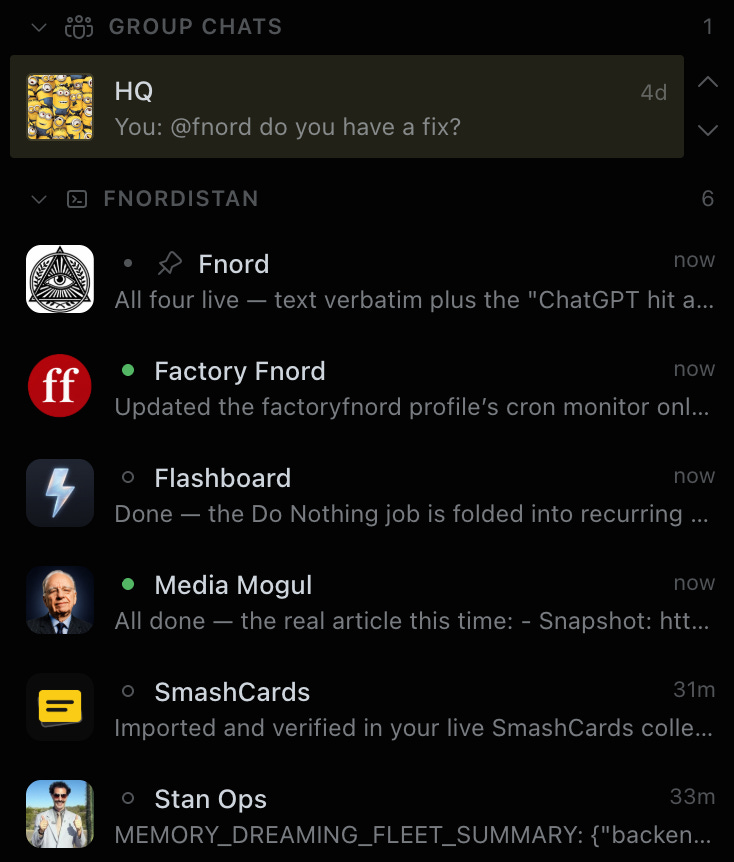
Hermes is my main always-on agent server. It runs Fnord, my “chief of staff”, as well as a menagerie of other agents, managing my various factories and functions. It uses all of my subscriptions and my favourite models. I connect to it primarily via Discord, where each bot has its own channel, as well as via the CLI and increasingly also the desktop app. It lives on Fnordistan (the realm of Fnord), a Hetzner VPS. It can connect to my Google Workspace accounts, GitHub, and other services, and accesses websites via the Browser Use cloud.
Hermes is an amazing open-source project, receiving hundreds of commits with improvements every day, and encapsulates incredible breadth and depth of capability. Even after months of use, I estimate that I don’t really know more than 20% of what’s possible. I can’t imagine what my life and work would be like without Hermes.
ChatGPT/Codex App
I tend to dislike the idea of locking myself to an app from a provider, but in this case I think it’s worth making an exception, because the app is so good. It also builds on open-source foundation (the Codex CLI and app server) and allows me to configure models from other providers.
The Codex desktop app is by far the most polished and powerful of its kind. I love being able to use live voice mode, which I now drive complete sessions with, and browser and computer use functionality (Codex can do anything for me in my Chrome browser or on my Mac desktop). Being able to connect to other instances (like my laptop, or my remote server) from the iPhone/iPad app also works great.
OpenCode
OpenCode was always awesome, but it keeps getting better. The harness improved a lot since the early days and is now on par with the best. It works with all of my subscriptions (Go, GPT, Grok, Copilot, OpenRouter). The terminal app is the absolute winner for beauty and usability, and it’s the perfect “sane defaults but everything is configurable” experience. I no longer use the desktop app, since I now drive OpenCode via ACP from Paseo (see below) but it remains the main harness for most of what I do. If I had to choose only one agent app, it would be OpenCode any time.
Paseo
I only discovered Paseo recently, but it quickly became one of my main tools for driving agentic work. Rather then implement its own harness, Paseo is a multi-device controller and surface. It runs a background process on every device (laptop and VPS, in my case), and provides a gorgeous and highly configurable and usable desktop app, as well as a web UI, and mobile apps. Using these surfaces, I can work with any of my harnesses – OpenCode, Hermes, Codex, Copilot, Cursor – via their Agent Client Protocol interface. It can also orchestrate multiple agents working in concert, and run automations on recurring schedules. Paseo is open-source and under active development and real pleasure to use.
Grok Bot
Grok Bot is xAI’s new entry to the alway-on cloud agent category. Similar, in a way, to OpenClaw and Hermes, but fully hosted and managed. I get access with my Jimini Cursor subscription, so I started using it to manage and automate some of my work there, following similar patters to what I have established with Hermes for my own personal and business needs. Not quite as flexible as Hermes, Grok Bot wins on ease-of-use. I expect to be using it a lot more in the future. It is also my recommendation to anyone who wants their own always-on assistant but can’t be bothered with setting up Hermes or OpenClaw.
GitHub Copilot Cloud Agent
I love cloud agents, as any of you who follow me probably already know. I firmly believe that delegating tasks to an agent working in the background on managed cloud infrastructure is a much better solution than driving a harness locally. There are many options, but I’ve been using GitHub Copilot for quite some time and, in my opinion, it is one of the best. It’s versatile and easy to configure and control, and is integrated conveniently into GitHub itself, which is where I do all of my coding work. I usually just let it got with auto model selection, where it picks up the best model for the task, and assign issues to it. I also use it a lot for scripting in automations, using the Copilot SDK, which is one of the best and most complete harnesses SDKs currently available.
Cursor Cloud Agent
I wan’t crazy about Cursor to begin with, and I’m still not much of a fan, but this is what we have at work, so I learnt to configure and use the cloud agent and I drive most of my work by delegating Linear issues to it. The best and most generous thing I can say about Cursor is that it’s fully functional and that it’s just about possible to configure it to do what you need, if you’re willing to bring some creativity and patience to bear on the task. I would not recommend it if you can choose something better.
Warp
Warp is lovely terminal app with lots of bells and whistles for the agentic age. In addition to hosting TUI/CLI agents well, it also includes its own harness, which allows me to switch between typing terminal commands and invoking an agent seamlessly. It can use my X Premium subscription for Grok, as well as my open models from OpenCode Go. I don’t use it much in this way, but it’s great to have the ability to start an agentic session in the middle of working in the terminal, and the app itself is great in general.
Raycast
I’ve been a huge fan and heavy user of Raycast for a while, and in v2.0 the AI capabilities have improved a lot. And in addition to using open models from my OpenCode Go subscription, I can now also hook it up to my GPT subscription. I use the Quick AI functionality very often for getting a quick answer to something, and the AI Chat for when I need to get something going with AI without the fuss of switching to a new app. The built-in agent now supports my Agent Skills collection, as well as MCP servers and the many AI extensions, so it’s quite powerful. There are also automations, custom agents, and AI commands – I don’t use these advanced features much, but I keep wanting to, because they’re clearly powerful and easy to use.
Harnesses and Apps I am NOT Using
Pi – everything about Pi and everyone I know who has good taste suggests that it is the harness for me. I keep trying to fall in love with it, then give up when I realise how much work is needed to configure it. But who knows, maybe it will still happen one day.
OpenClaw – I tried it a long time ago and it didn’t really catch. I later on tried Hermes and got hooked. Is Hermes really that much better? I don’t know, probably by now OpenClaw has improved a lot. But I don’t have space in my life for another one of these.
Codex Cloud – I’d like to, and it’s included in my subscription, but it’s really hard to use. Must try harder, OpenAI.
T3Code – I tried it for a bit and it’s nice, but doesn’t come close to Paseo for the same kind of multi-harness/multi-device controller approach.
Copilot CLI and Desktop, Cursor, Grok Build, Muse Code, and many others – they’re all fine, but I can’t use to many different harnesses and apps.
This is a great overview from a expert practitioner. Thank you, Eleanor, for inspiring me every day.